


Google Search Console officially released its AI-powered configuration tool for users worldwide. This new feature is designed to simplify how marketers and SEO teams interact with complex search performance data every day.
Understanding website performance has traditionally required a lot of manual clicking. You had to set filters for dates, countries, and devices one by one. Now, we can simply “talk” to the tool (through prompts) and get the specific report configuration we need much faster.
The big shift here isn’t that AI is doing SEO for us. The shift is that AI is removing the repetitive parts of report setup so we can spend more time on what matters: decisions, insights, and action.
What is the AI-Powered Configuration Tool?
The AI-powered configuration tool is a new assistant found inside the Performance report in Google Search Console. It uses natural language processing to turn our sentences into technical report filters. Instead of navigating multiple menus, we type what we’re looking for in plain English.
This tool reduces the time spent on manual data mining. It helps us focus on making decisions rather than spending energy just to set up views, filters, and comparisons. It’s also a meaningful step toward making high-level SEO reporting more accessible to more users.
Author’s note: The tool’s purpose is configuration—building the report view—rather than interpretation or diagnosis. Treat it like a smart filter builder, not an SEO consultant.
How to Access the Tool
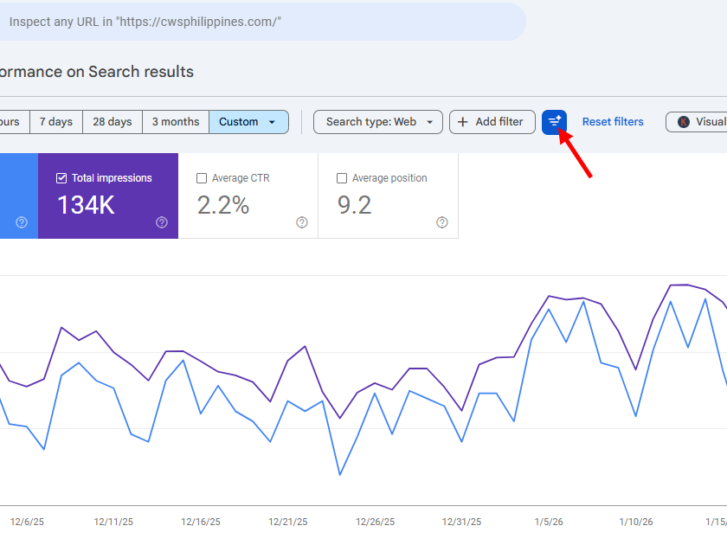
When you open your Performance report, look for a filter icon at the top besides the reset filter button. This button will lead you to customize your report using the power of artificial intelligence. Clicking this icon opens a simple prompt box where you can type your requests.
Once you enter a prompt, the AI instantly applies the correct filters for you. It can select metrics, set date ranges, and even compare different time periods. You then review the filters to ensure they match your original intent perfectly.
Author’s Note: Right after the AI applies a configuration, we recommend you verify these 3 things before making conclusions:
- Did it use the exact period you intended (last 28 days vs last 30 vs calendar month)?
- Are you looking at Queries, Pages, Country, Device, or Search appearance? (Wrong dimension = wrong story.)
- If you asked for a comparison, confirm it’s actually “Compare” and not just a changed range.
Core Features of the AI Assistant
The tool is quite versatile and handles several different parts of report setup. It is built to understand common SEO questions and translate them into data views. Here are the main things the AI can do for you right now.
Smart Filtering and Date Comparison
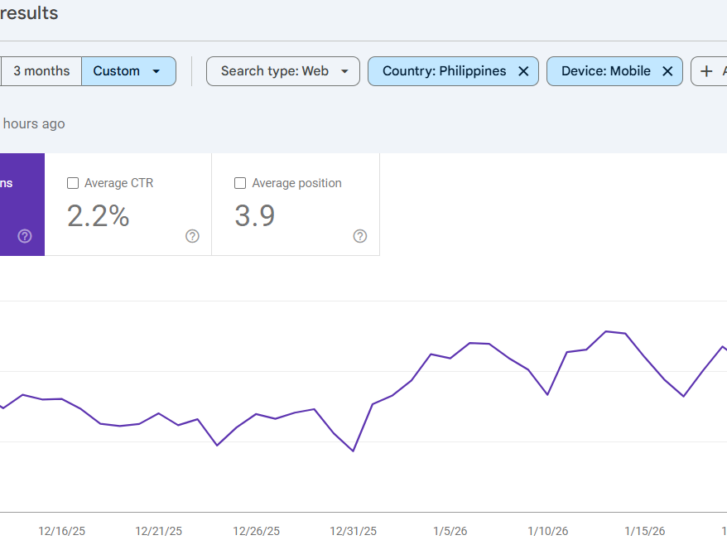
You can ask the tool to show data for specific queries or pages. For example, you might ask to see searches from mobile devices in the Philippines. The AI will filter out everything else and show you exactly that specific data.
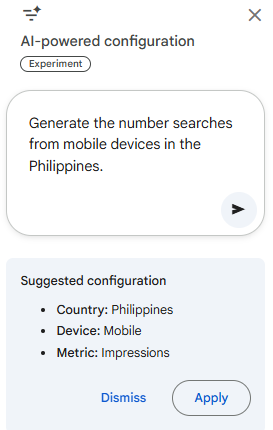
Here’s the result:
Setting up date comparisons used to take several clicks and careful selection. Now, you can simply ask the AI to compare this month to last month. It can even handle year-over-year comparisons for specific quarters or busy seasons.
Author’s Note: If you want this feature to actually drive decisions (not just prettier reports), do this weekly:
- Prompt 1: “Compare last 7 days vs previous 7 days for clicks and impressions.”
- Prompt 2: “Show queries with impressions up but CTR down.”
Action: Update titles/meta for the top opportunities first, then re-check next week. (That’s a real feedback loop.)
Automatic Metric Selection
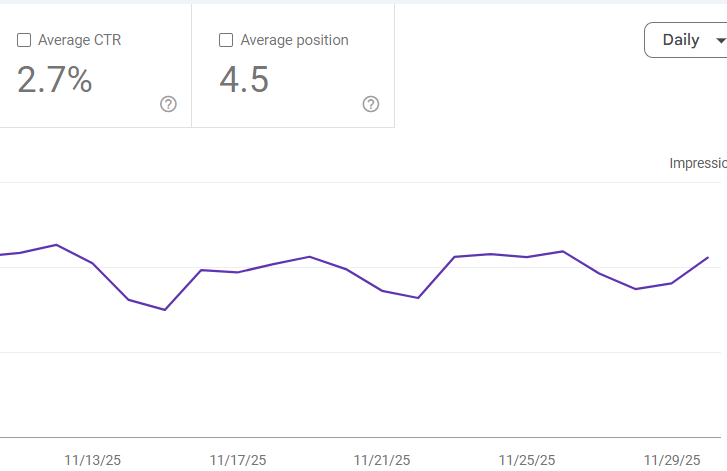
The tool knows which metrics are most important for your specific questions. If you ask about visibility, it will toggle the Impressions and Position checkboxes. If you ask about traffic, it will focus on Clicks and Click-Through Rate.
This ensures you are always looking at the most relevant data for your goals. You no longer have to manually check or uncheck boxes to clear your view. The AI streamlines the interface to show only what matters most to you.
Here’s an example:
Author’s Note: A lot of teams get stuck reporting numbers that don’t change behavior. Here’s a simple rule:
- If your goal is growth, prioritize Clicks + CTR + Position (then ask what to improve).
- If your goal is awareness, prioritize Impressions + Position (then expand content coverage).
- If your goal is conversion, remember GSC won’t answer conversion questions—pair the report with GA/CRM data before making business calls.
At a Glance: Manual vs. AI Setup in GSC
| Task | Manual Reporting | AI-Powered Reporting |
|---|---|---|
| Apply Multi-Filters | 5-7 clicks across different menus. | One natural language sentence. |
| Date Comparisons | Manual date picker and toggles. | "Compare this week to last week." |
| Specific URL Groups | RegEx or manual string typing. | "Show pages with 'blog' in the URL." |
| Metric Toggling | Manual check-boxes for metrics. | Automatic toggling based on your question. |
Important Limitations to Remember
While the tool is very helpful, it is currently in an experimental phase. Users must understand what the tool can and cannot do to avoid errors. Relying too heavily on AI without checking the work can lead to mistakes.
Only for Search Results
Currently, the AI tool only works within the Performance report for standard Search results. It does not yet support data from Google Discover or Google News. If your site relies on these sources, you still need manual filters for now.
Configuration, Not Analysis
It is important to remember that this is a configuration tool, not an analysis tool. It builds the report for you, but it does not explain the data. It won’t tell you why your impressions dropped or how to fix the issue.
No Sorting or Exporting
The tool cannot yet perform actions like sorting tables or exporting data to CSV. You must still click the column headers to sort your data manually. If you need to download the report, you must use the standard export button.
Power Prompts for 2026
To get the most out of this tool, you should use clear and specific prompts. Using standard SEO terms helps the AI understand you better. Here are some prompts to try in your own account.
- “Show me my top 10 performing pages by clicks this month.”
- “Compare mobile versus desktop clicks for the last 90 days.”
- “Identify queries with high impressions but low click-through rates.”
- “Show performance for all URLs that contain the word ‘guide’ in them.”
Key Takeaway
The release of the Google Search Console AI-powered configuration tool represents a major shift in the SEO landscape of 2026. By automating the tedious work of setting filters and comparing dates, Google is giving you back hours of your work week. This time should be reinvested into high-level tasks that AI still cannot perform: understanding user intent, building human connections, and creating unique, lived-experience content.
The future of search belongs to those who can ask the right questions. The AI is now here to provide the answers in seconds, but your success still depends on your ability to interpret those answers and turn them into a winning business strategy. Don’t just use this tool to work faster—use it to work smarter.
The post Google Search Console’s New AI Upgrade: Pull 2-Hour Reports in 20 Seconds appeared first on SEO Services Agency in Manila, Philippines.


