



For almost two years, every SEO has been asking Google the same question: my traffic is dropping, AI Overviews are eating my clicks, but is my content even showing up inside them? Search Console never had an answer. You could see impressions dip in the regular Performance report, you could suspect AI Overviews were the culprit, but there was no way to confirm it, let alone measure it.
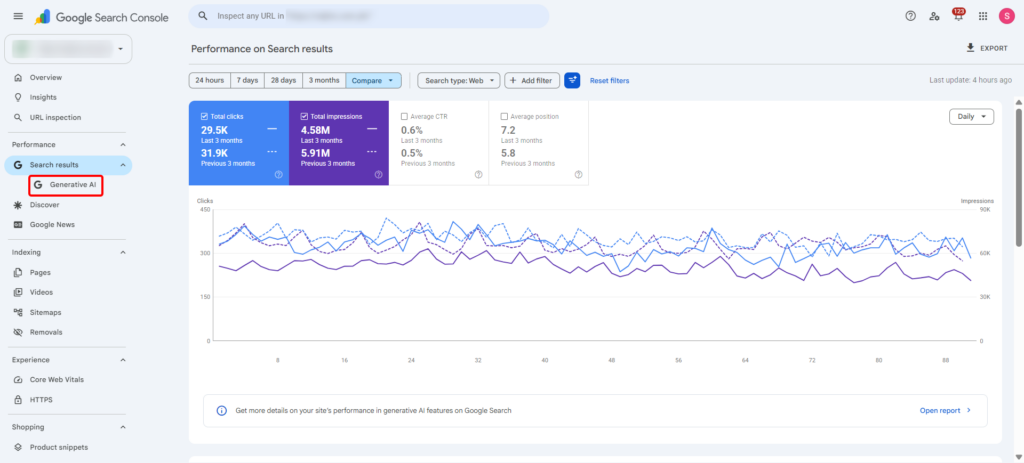
That changed on June 3, 2026, when Google rolled out Search Generative AI performance reports inside Search Console. For the first time, site owners get a dedicated view of how their pages show up inside AI Overviews, AI Mode, and the generative features now appearing in Discover — separate from the classic blue-link data you’re used to.
This guide breaks down what the new report actually shows, what’s still missing, who can access it right now, and how to fold it into the way you already read your Search Console data.
What is the Search Generative AI Performance Report?
It’s a new, dedicated section in Search Console that isolates your visibility inside Google’s generative AI Search features. Instead of guessing which slice of your impressions came from AI Overviews versus regular organic results, you now get a report that separates the two — with its own tabs for pages, countries, devices, and dates, mirroring the structure of the Search Analytics Report most of us have relied on for keyword-level performance for years.
The data isn’t sitting in isolation either. Google has said it will keep folding this AI visibility data into the overall Performance report too, so you’ll eventually be able to see it alongside your existing organic numbers rather than as a completely separate silo.
The report currently sits under both the Search results and Discover sections in Search Console, each carrying its own “Generative AI” view, and each labeled Beta — a reminder that this is very much version one.
If you’ve spent any time in the Search Analytics Report inside Search Console, the layout will feel familiar — it’s the same logic of breaking performance down by page, country, device, and date, just applied to a different slice of your visibility.
What Data you Actually Get
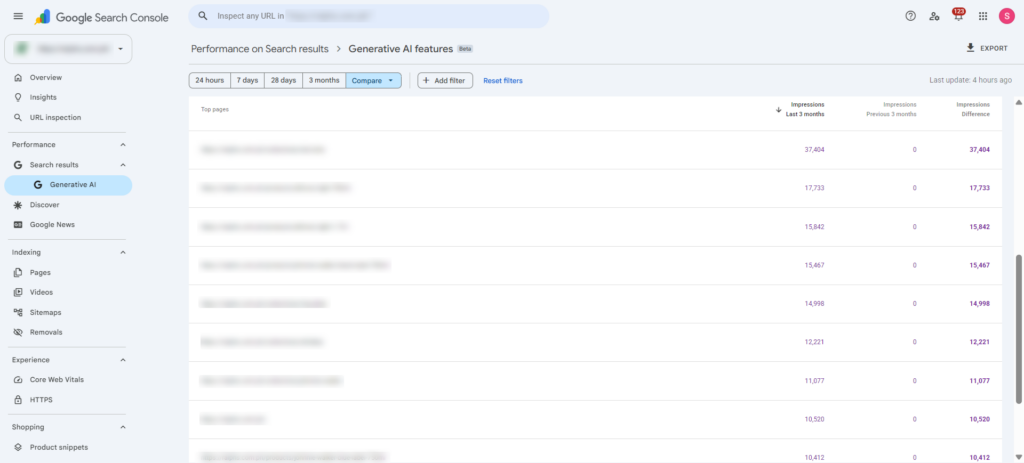
Google confirmed five dimensions in the new report:
- Impressions — how often URLs from your site appeared inside generative AI features across Search and Discover.
- Pages — which specific URLs got pulled into AI responses.
- Countries — a geographic breakdown of where that visibility is happening.
- Devices — available for Search results, showing whether that visibility skews mobile or desktop.
- Dates — with hourly, daily, weekly, and monthly views so you can track trends over time.
Notice what’s not on that list: clicks, click-through rate, and query-level data. You can see that your page appeared inside an AI Overview, but you can’t yet see what query triggered it or whether anyone actually clicked through afterward. When asked directly about this gap, a Google spokesperson gave the same non-committal answer they’ve given for most reporting requests over the years — that they’re “continuing to work with website owners to understand what insights will be most helpful” and will add more metrics over time, without committing to a timeline.
That’s a real limitation. Impressions tell you that you’re being pulled into the AI layer, but they can’t tell you whether that visibility is actually translating into traffic. If you’re already tracking how AI Overviews have reshaped click behavior on your site, you’ll want to keep pairing this new report with your own referral data rather than treating impressions as a stand-in for traffic value.
Where to Find it, and Who has Access
Google is starting to give us visibility into generative AI search performance — but like most things Google, it is not arriving for everyone at the same time.
They launched the report earlier in June, beginning with a limited UK test before rolling it out in waves globally, and no set dates on when these reports will be fully accessible in other regions. As of time of writing, not all Philippine-based websites on Google Search Console have Generative AI reports.
The UK-first rollout isn’t a coincidence. The UK’s Competition and Markets Authority had been pushing Google to give publishers more visibility and control over how their content is used in AI features, and this launch is Google’s response to that pressure. It also lines up with earlier reporting that roughly a third of publishers said they’d block their content from AI features entirely if given the option — a sentiment Google clearly couldn’t ignore forever.
Worth noting: Bing Webmaster Tools beat Google to this by a few months, shipping its own AI performance report back in February. Bing’s version is already available globally rather than restricted to one market, though it has the same blind spot — no click data there either.
The New AI Content Blocking Toggle
Alongside the reporting, Google introduced a separate control that lets site owners decide whether their content should be used to generate AI responses at all. Flip it off, and Google says your pages won’t be used to ground AI Overviews, AI Mode, or the generative version of Discover — and, importantly, your site won’t receive impressions or traffic from those features either, since it’s opted out entirely.
Google has also been clear that this toggle is not a search ranking signal outside of the generative AI features themselves. In other words, opting out of AI grounding shouldn’t tank your position in regular blue-link results. Whether that holds up in practice over the long run is something the SEO community will be watching closely, the same way we watch every new Google control before fully trusting it.
Like the reporting, this toggle is only available to a subset of UK site owners for now, with wider access promised “after sufficient testing.”
Why this Rollout Matters
This launch sits at the center of a tension that’s been building since generative AI began reshaping how people search back in 2024: Google uses the open web’s content to build its AI answers, but publishers have had no way to verify how their content is being used, measure the payoff, or decide whether it’s worth continuing to invest in content that feeds a system they can’t see into.
That frustration has shown up in very concrete ways — more sites experimenting with robots.txt rules aimed at AI crawlers, more publishers pushing back publicly, and regulators in the EU and UK applying pressure on Google to open things up. This report, paired with the opt-out toggle, is Google’s first real answer to all of that. It’s a meaningful step. It’s also, by Google’s own admission, an incomplete one — impressions without clicks only tell half the story of what generative search is doing to your traffic.
How to Actually use This Data
Once the report lands in your property, here’s how to put it to work rather than just staring at a new impressions graph:
- Compare it against your existing Performance report. Pull up your regular Search Analytics data for the same date range and look at the gap between total impressions and AI-feature impressions. A widening gap over time is a signal that more of your visibility is shifting into the generative layer — useful context if you’re already measuring your AEO performance beyond clicks using metrics like AI share of voice.
- Cross-reference pages, not just totals. The Pages tab tells you which URLs are getting pulled into AI responses. If your best-performing organic pages aren’t showing up here, that’s worth investigating — it may point to a structural issue similar to what shows up when content isn’t formatted for easy AI extraction.
- Watch the country and device splits for localization gaps. If your AI visibility is concentrated in one country or skews heavily toward one device type, that’s a signal for where your content is (or isn’t) being trusted enough to surface, especially relevant if you’re running a localized strategy aimed at getting recommended by AI systems in specific markets.
- Don’t treat rising impressions as rising traffic. Since clicks aren’t in the report, resist the urge to celebrate an impressions spike as a win on its own. Tie it back to your actual referral logs and conversion data, the same way you’d validate any other AEO metric that isn’t clicks.
- Think carefully before touching the opt-out toggle. If your business model depends on organic discovery, opting out of AI grounding could cut off a channel that — even without clicks today — may carry brand and citation value down the line, similar to how citation share in AI summaries has started functioning like a modern version of featured snippet ownership. This is also a good moment to revisit when it makes sense to update versus create new content for AI search, since pages that never surface in AI features may need more than a tweak.
What’s Still Missing
To be upfront about the gaps: there’s no click data, no CTR, and no query-level detail yet. You won’t know which specific search terms or conversational prompts triggered your appearance inside an AI Overview, which makes it hard to optimize content for the exact way people are phrasing multi-turn, conversational queries in AI search. Access is also still limited to a subset of Google Search Console properties, so most site owners reading this won’t have the report live in their own account just yet.
Google has said additional metrics are coming “over time,” but has stopped short of committing to what those metrics will be or when they’ll ship. Given how long it took to get even impressions-level data, it’s reasonable to expect a similarly gradual rollout for anything more granular.
Frequently Asked Questions About Generative AI Performance Reports
Does the Search Generative AI performance report include click and query data?
No. As of the June 2026 launch, the report includes impressions, pages, countries, devices, and dates, but no clicks, CTR, or query data. Google has said more metrics will come over time, without a confirmed timeline.
Who can access the report right now?
It’s rolling out to a subset of website owners in the UK. Google has said it plans to expand access globally, but hasn’t shared a specific date.
What’s the difference between AI Overviews and AI Mode in this report?
Both are tracked under the same Generative AI view. AI Overviews are the summarized answers that appear above traditional results, while AI Mode is Google’s more conversational, chat-style search experience. The report counts an impression whenever your URL appears in either.
Should I use the new toggle to block my content from AI features?
That depends on your traffic mix and business goals. Opting out means your content won’t be used to ground AI responses and won’t earn impressions from those features, but Google says it won’t affect your ranking in standard search results. Weigh that against the reality that AI visibility, even without clicks today, may still carry brand exposure worth keeping.
How does this compare to what Bing already offers?
Bing Webmaster Tools launched its own AI performance report earlier, in February, and it’s available globally rather than restricted to one market. Neither report currently includes click data.
Key Takeaway
This is the first real crack in the black box of generative search measurement — and it’s a welcome one. But treat it as a starting point, not a finished dashboard. Impressions without clicks tell you where you’re being seen, not what that visibility is worth. Until Google fills in that gap, the smartest move is to layer this new report on top of the analytics and Search Console habits you’ve already built, rather than letting it replace them.
The post Search Generative AI Performance Reports in Search Console: What They Show and How to Use Them appeared first on SEO Services Agency in Manila, Philippines.


